


What’s Changed?
The Files tab is now called Shared, and it’s designed to make life easier. Instead of juggling tabs or scrolling through endless conversations, everything you share in a channel now lives in one place.
Inside the new Shared tab, you’ll find two handy views:
- In library: This is your familiar space with folders and documents from the channel’s SharePoint library, just like before.
- In messages: Here’s the game-changer. Every file or link shared in channel conversations is neatly organized, so you don’t have to dig through chat history to find that one document someone dropped last week.
In short: no more hunting, no more guessing. Everything shared in the channel is now under one roof.
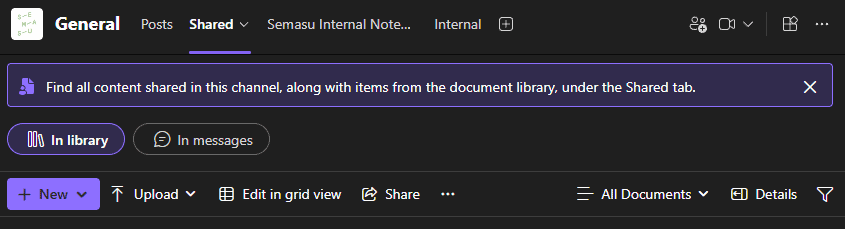

When you want to view the files shared in messages, you can even filter on Recent items, Files or Links. You can even filter by keyword to find what you are looking for even faster.


Answering the most common questions we receive:
Why the Change?
Microsoft wants Teams to feel more consistent and collaborative. Chats already have a Shared tab, so bringing the same concept to channels makes sense. Plus, this update sets the stage for better features like keyword search in Shared, which is rolling out soon. That means finding files will be faster than ever.
When Will You See It?
The rollout started in 2025 and is continuing into early 2026. If you’re seeing “Shared” instead of “Files,” congratulations… you’re on the new version.
Are My Files Safe?
Absolutely. This is just a name change and a smarter way to organize content. Your documents haven’t moved, disappeared, or been deleted. They’re right where they’ve always been, just easier to find.
What Should You Do?
Let your team know about the change to avoid confusion.
Update any internal guides or screenshots that mention the old “Files” tab.
Need Help Navigating Microsoft 365 Changes?
At Semasu, we make sure updates like these don’t slow you down. Whether it’s training your team, streamlining workflows, or unlocking the full potential of Microsoft 365, we’ve got you covered.
- Want to make Teams work smarter for your business?
- Need help with adoption and best practices?
Let’s talk!